Congratulations, you’ve made it through the worst of the semester doldrums, and the end of term is in sight! It is also time for more unsolicited advice from me, harried college professor and spinster aunt of Tumblr.
For the love of all that is good and holy, COMMUNICATE WITH YOUR PROFESSORS. Professors like this. We find it reassuring. This is because we care about your well-being. Note that I say "your well-being” and not “your academic success.” We totally do care about your academic success too. But on communication hang, as it were, all the law and the prophets. Why do I find it necessary to write this blog post? Because struggling students tend not to come to me until assignments are overdue, and we’re both stressed out and anxious about the situation by that point. Also, I see a lot of students very hesitant to come into office hours without “something to show” or “ideas to discuss.” In response to these phenomena, I wish to say this:
THERE ARE NO PREREQUISITES FOR COMING TO OFFICE HOURS.
If you’re struggling to find ideas or create “something to show” or… anything, really, then that is a good time to talk to the person who is an expert in the subject matter you’re working with and who is responsible for designing the assignments you’re working on. There is no bad time to visit office hours. You can set up appointments if the usual hours don’t work for you. Some professors even have tea on offer. And popping into a 10- or 15-minute meeting can really pay dividends, I promise… not least because it communicates to your professor that you are serious about developing skills and/or mastering content. Talking with students about work is literally what office hours are for. In theory. In practice they’re for me drinking too much coffee and worrying about the students who aren’t coming to see me.
Additional communication strategies include:
Quick pre- or post-class questions to clarify small points
Drawing the professor’s attention to tech glitches, if you have an LMS you’re using for the course (I am always, always grateful for this)
Sending emails
Responding to emails
All of these things demonstrate engagement, and that is a good thing. Also, re: responding to emails… for the love of all that is good and holy, answer your professors’ emails, even if it’s only to confirm receipt! This isn’t necessary for a general message to the class, but if you’re being sent a list of references, or a question about field trip registration, or a missing assignment… answer the email. I’m not gnashing my teeth in my professorial lair, waiting to assign demerits if the answer to the email is something along the lines of “I’ve been really overwhelmed and have barely even started the assignment; can I come to your office hours?”
Please. If you’re struggling, or if you’re not; if you want a little extra help, or just want to talk more about Wednesday’s reading… communicate with your professors. And consider coming to office hours; there might be tea.
Anxiously and affectionately yours,
A College Instructor With a Stress-Induced Twitch
Hey kiddies, it’s the beginning of the academic year for many of you so here’s your reminder to communicate.
I know a few of you have expressed admiration for the work I do and the subjects I’m versed in. The truth is, despite all the confidence I show on my blog, I struggled hard to get this far. The reason I made it? I talked to my teachers. I know firsthand how scary it can be to open up about the difficulties you’re experiencing – whether it’s your workload, unclear expectations, deadline management, self-doubt, or mental health issues – but please, please step past that fear. It’s incredibly worth it and necessary. The fact I’m starting my masters degrees this semester doesn’t just stem from academic ability: I owe a large part of it to the guidance, advice and support I sought out.
Your teachers want you to succeed, but they can’t read your mind. If something is holding you back, communicate about it. Together, you can find a solution.
As someone who has taught at college, I can confirm. If the professor isn’t helping another student and there’s no one waiting, it’s perfectly fine just to stop in and say hello – many of us like to be able to put a face to the student’s name. I know professors who shortened or cancelled office hours because of apparent lack of student interest, and the possibility someone might at least stop by for a chat may be an incentive to maintain scheduled hours.
So one of the most frequent questions I get, is how do I work at a computer all day and avoid eyestrain, which is something people with chronic fatigue can be especially susceptible to, especially given our sensitivity to bright lights. And the answer is: I don’t. Working at my desk all day every day absolutely hurts my eyes, and makes me more prone to migraines and profound exhaustion which if I’m not careful can put me out of action for several days.
I do manage to limit how often this happens though by making sure I take care of myself, and this includes things like taking regular breaks from the screen to rest my eyes, using a screen dimmer like “night mode” constantly (comes as standard with Windows 10, might also be in other versions but I don’t remember) or a program like Flux which
adapts to the time of day, warm at night and like sunlight during the day, so that looking at your screen isn’t like staring into the sun at 3 in the morning. I also make sure my prescription for my glasses is up to date, and also wear glasses that have a special UV filter that gives everything a bit of a yellow tint to soften the light. Some people say they work, some people don’t. I’m someone who is particularly sensitive to light, and I have found the slight yellow tint to be beneficial to my eye health.*
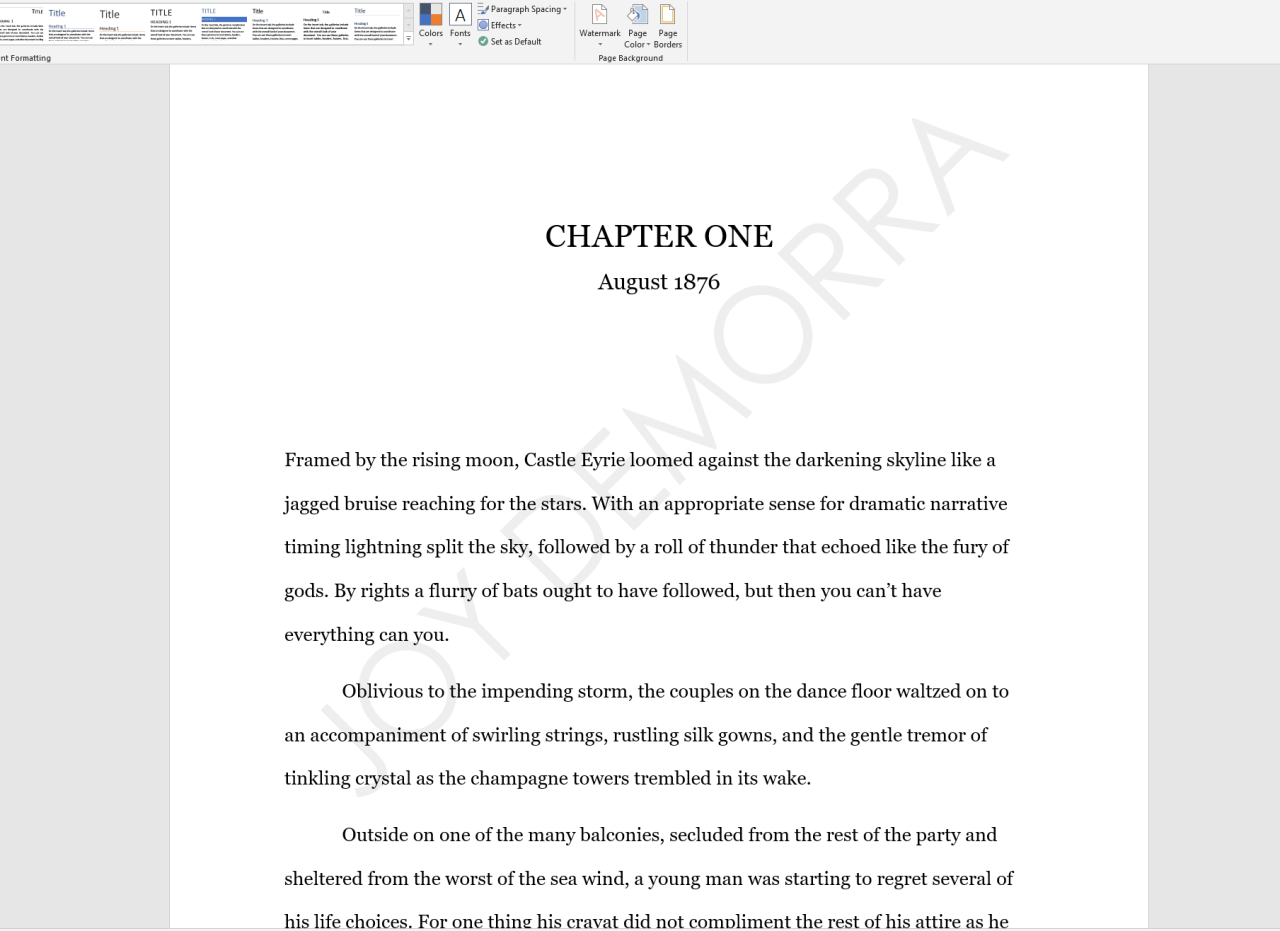
But even doing all these things, opening Word can absolutely feel like you’re searing your retinas off when you open up the document and the white expanse of doom takes over your entire screen, like this:
This right here? Makes my myopia extremely pronounced in my right eye, and makes the visual floaters that I get extremely hard to work with. There are days when it feels like all I can see are those little black squiggles over my vision, and the white screen is absolutely to blame, even with all those other measures in place. (I have absolutely worn sunglasses indoors to get around using software that only lets me use a white screen.)
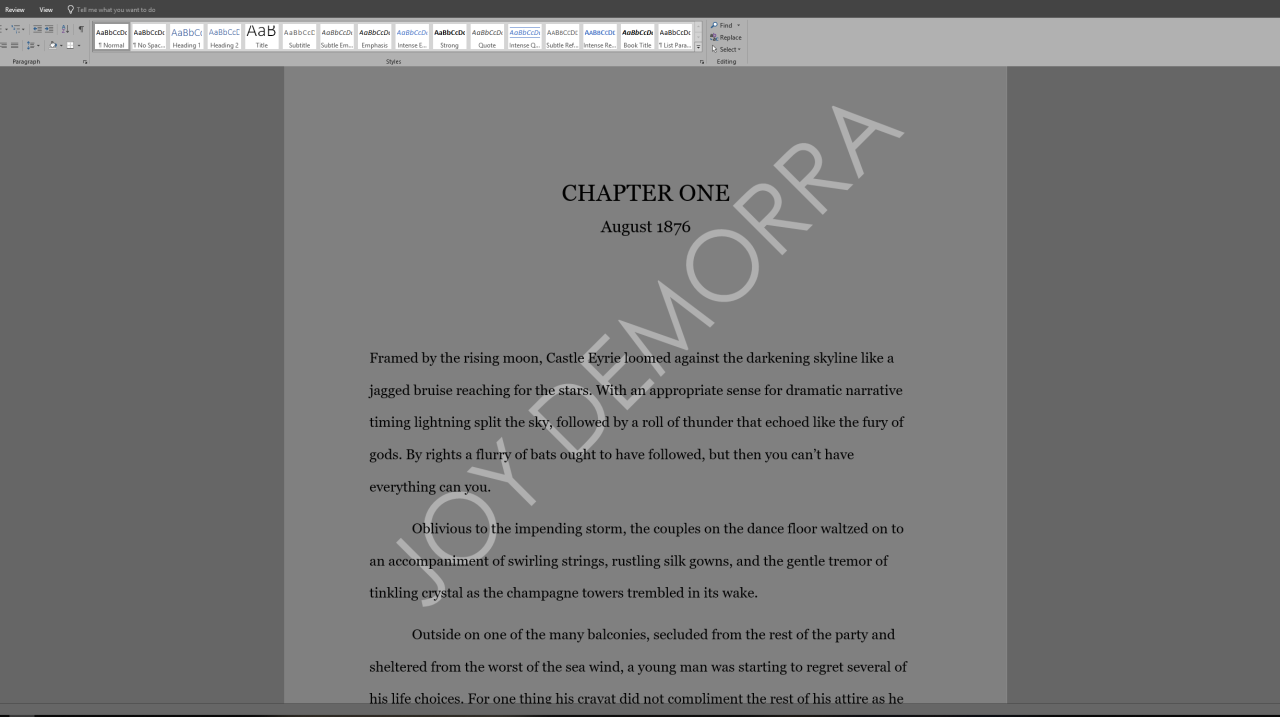
And it’s been brought to my attention in answering lots of questions about eye health and managing my symptoms, that some of you are not aware that Word doesn’t have to be like this, when it can in fact be like this:
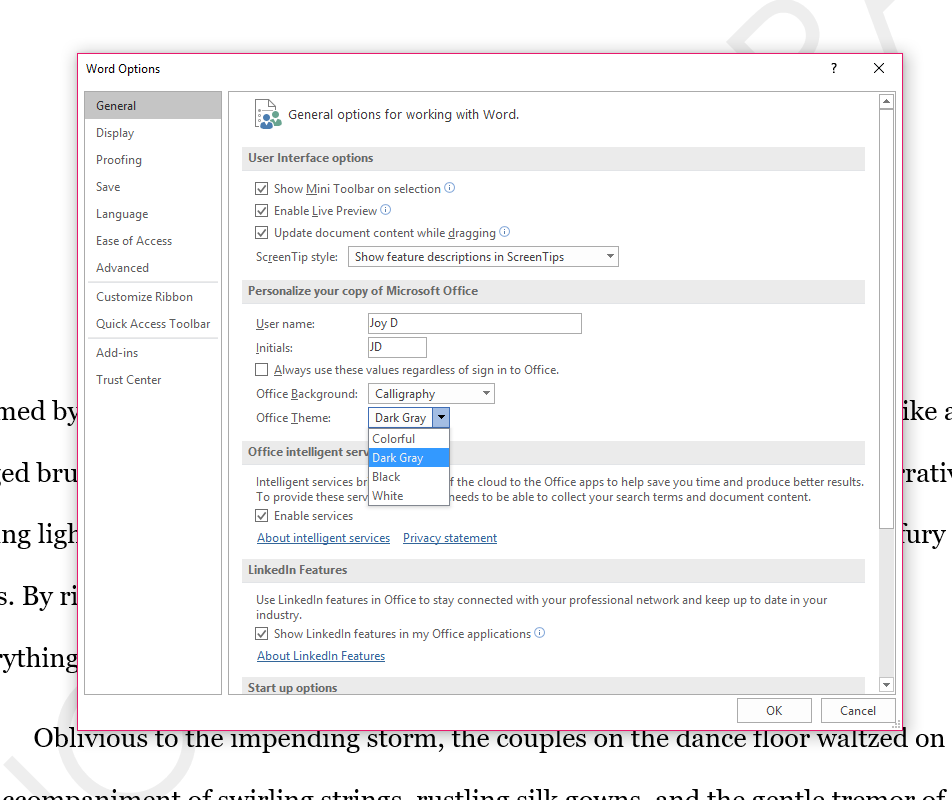
And it is so much better for you. I mean it doesn’t have to be this specific color setting, you can play around with it and find the color setting that doesn’t hurt your eyes or trigger migraines/makes it easier for you to read and follow text, but I have found dark grey and blues to be what works best for me, and the way you change these settings is to first of all go into File > Options > General and then changing the Word theme from “Colorful” to “Dark Grey”
Which will give you this look:
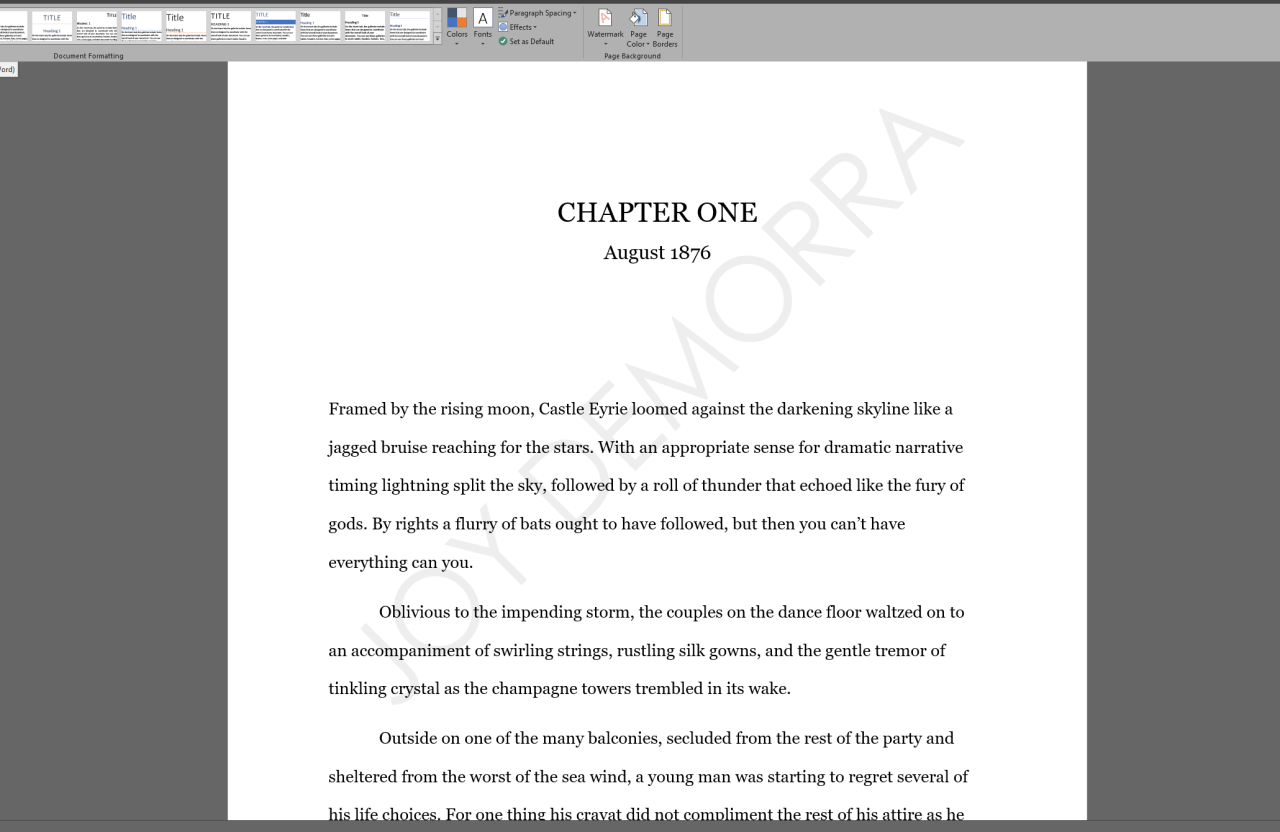
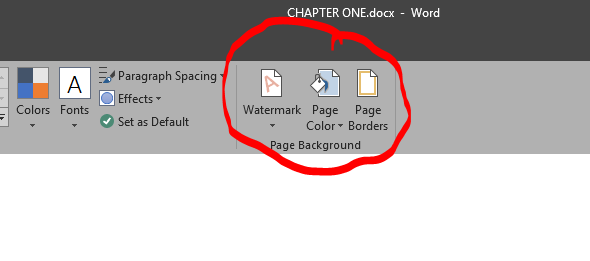
And for some people that will be enough of a reduction in white screen to help with eyestrain and other problems, but if you are like me and the bright white is just playing havoc with your vision/processing, you can go up to the Design tab (it’s between Insert and Layout usually) and change the color of the text file page:
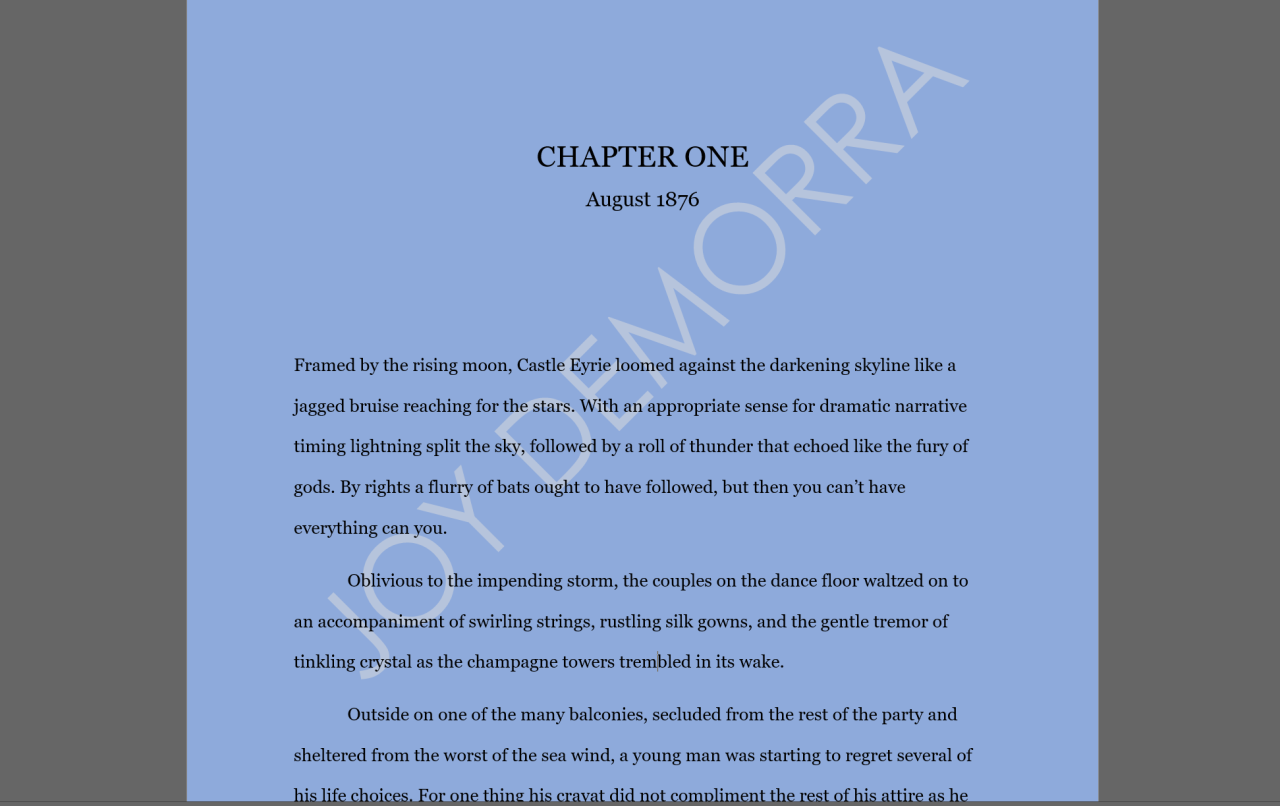
Like so:
Like I said, dark greys and blues work best for me, and this is what manuscripts look like when I am reading them for work, but you can totally play around with it and find what works for you, and hopefully help yourself avoid some of that “oh god my eyes feeling” that happens from staring at the blank white page for hours on end before you alt out the tab and pull up tumblr instead.
Anyway, hope that helps some of you? Good luck? Don’t hurt yourselves unnecessarily? Go take a break from your screen right now and get something to drink? idk, just take care. You deserve to.
source: im a grad student. i’ve had a lot of school. also i’m adhd & mentally ill and require +8 organization. this is mostly directed @ college students, but maybe high school students can use it too, fuck, idk, it’s been forever since i was stuck in that hell hole
I know it can be a nightmare to dig through our tags and see all those asks and not the guides. So here is a handy-dandy list of all our “official” how-to posts.
recuva – accidentally deleted something in the recycling bin? recover it back with this program!
speccy – tells you the specs of your computer, among other things
defraggler – defrag the SHIT out of your hard drive and clean it right up
This is a great post what makes it even better is that most of these you can get from Ninite which will download and install the latest versions of all available software ALL AT ONCE without you having to worry about adware or the annoying clutter (toolbars, changing your default search engine) that sometimes comes with their individual installers. So, yeah. Have at it folks.
Yes! There’s a whole feature on the site called Under the Gaydar that’s exactly books whose covers and blurbs don’t reveal that the book has queer content: https://lgbtqreads.com/category/under-the-gaydar/ (note: read the intros carefully, as a couple of the posts are dedicated to books that are obviously queer but aren’t obvious that they have very rare rep.)
If you can’t safely open that link, I’ll just tell you some great options:
If you’re a fantasy person, try LABYRINTH LOST by Zoraida Cordova and GIRLS MADE OF SNOW AND GLASS by Melissa Bashardoust.
If you’re a thriller-mystery person, try FAR FROM YOU by Tess Sharpe, TRUST ME, I’M LYING by Mary Elizabeth Summer (character comes into her sexuality in the second book but it’s worth starting at the beginning), BEFORE I LET GO by Marieke Nijkamp, and PEOPLE LIKE US by Dana Mele.
If you’re interested in more intense contemporary, try THIS IS WHERE IT ENDS by Marieke Nijkamp, PICTURE US IN THE LIGHT by Kelly Loy Gilbert, and PAPERWEIGHT by Meg Haston. (And set your sights on ANGER IS A GIFT by Mark Oshiro, which releases May 22.) For lighter stuff, grab CHERRY by Lindsey Rosin and WINNING by Lara Deloza.
For sci-fi and speculative fiction under that umbrella, try PROXY by Alex London, THE SCORPION RULES by Erin Bow, HEART OF IRON by Ashley Poston, and THEY BOTH DIE AT THE END by Adam Silvera.
For magical realism, you want WILD BEAUTY by Anna-Marie McLemore.
Most of those should be in the YA section at your local library as they’re all either pretty big titles or recent releases, but if you need more suggestions, let me know!




 willowfoot